
Payment Control: the monthly payments grid
Open Student Billing and select the payments tab. The grid combines students and months to review fees, covered periods and outstanding issues. You need permission to register payments; an
Where: Payment Control
Updated on
Open in MatGoatOpen monthly payment control
Open Student Billing and select the payments tab. The grid combines students and months to review fees, covered periods and outstanding issues. You need permission to register payments; an administrator can review access when the option is missing.
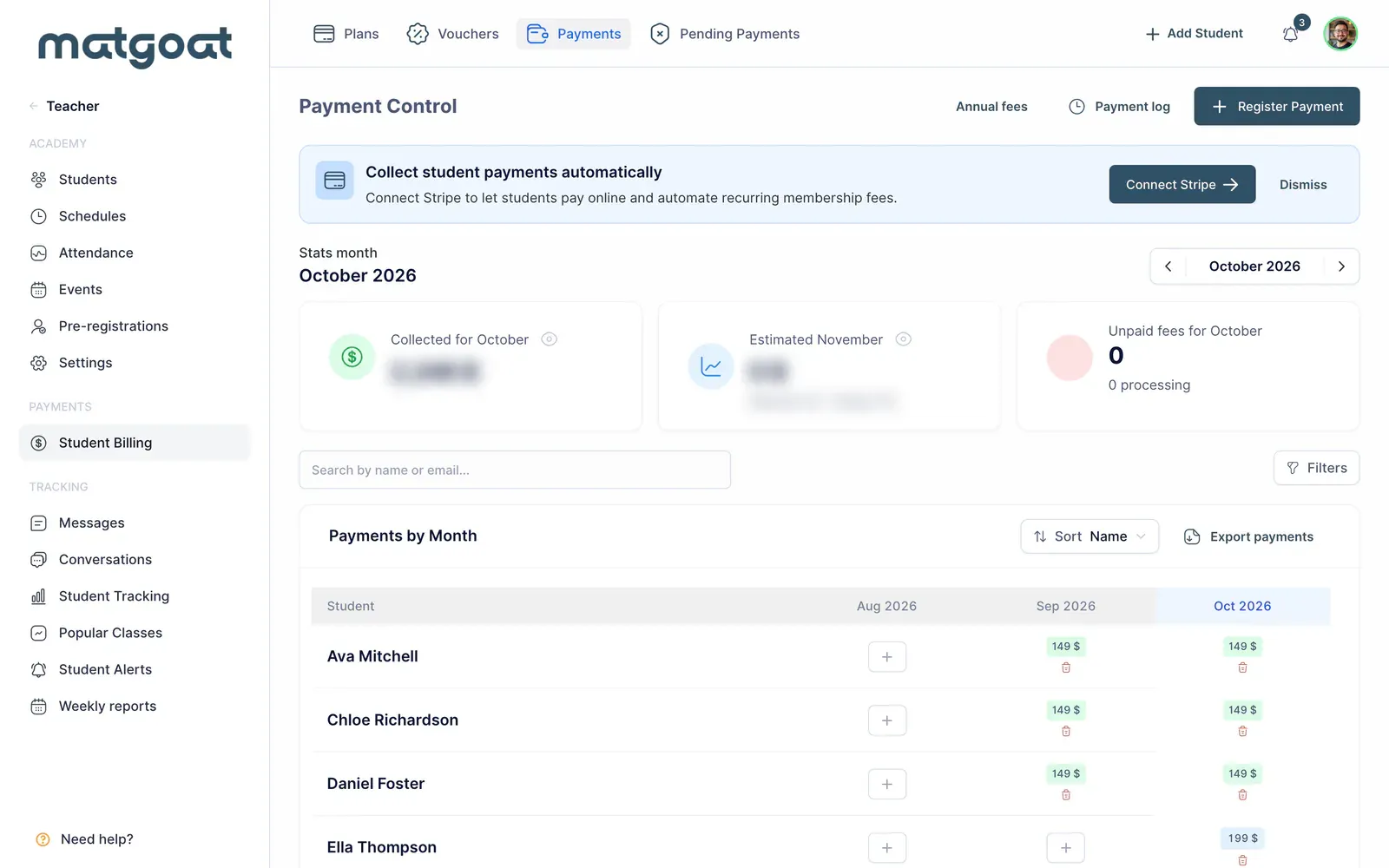
Select the period you want to inspect and check the visible months before adding or correcting an amount. An annual view, recent months and the current month cover different ranges. A cell’s position forms part of the payment information, rather than merely changing its presentation.
Interpret the cells
Review the student’s status and details before treating an empty cell as a debt. A free plan, pause, waiver or family coverage can explain the absence of an ordinary fee. Payment status and access conditions are related, but they are not interchangeable.
A payment covering several months can be distributed across its covered periods. This monthly coverage does not mean money was received several times. Keep the receipt date separate from the months of access when comparing the grid with bank transactions.
Search and save a view
- Search for the student by name or email
- Apply the status, plan, payment-method or group filters you need
- Review the period and any activity filter you have used
- Save the combination as a view when you will use it regularly
A saved view preserves filters, not a frozen copy of the amounts. Opening it again shows the records satisfying those conditions at that time. If you choose a default view, bear it in mind when a later visit displays fewer students than expected.
This page’s activity filter uses its own criteria. Do not compare its total directly with another active-student list without also reviewing the filters and dates used there.
Record and correct a payment
The add symbol in a cell records a simple payment for that student and month. Quick options in the contextual menu help when you already know the amount and method. Before confirming, check the selected person and period.
For payments involving a plan, enrollment fee, half month or several covered months, use the complete registration form. Where inline amount editing is available, change only a receipt you are authorised to correct and verify the result after saving.
Review totals and exports
The amount-visibility control shows or hides the financial figures on screen. Check the statistics period before interpreting a figure as money received. An estimated indicator does not replace reconciliation of actual collections.
Exporting uses the selected filters and lets you review the records outside MatGoat. Continue with Receipts, Stripe invoices and payment exports to choose the appropriate document and Record a cash, bank transfer or Bizum payment to correct a particular entry.
Related articles
Still have questions?
Write to us and a real person will answer, in your language.