
Set the first charge: full month, proration or payment at reception
An administrator configures these options in Settings > Payment options. A subscription's first amount can differ from its normal fee because of the joining date, enrollment fee, trial or
Where: Payment options
Updated on
Open in MatGoatSeparate the first charge from renewals
An administrator configures these options in Settings > Payment options. A subscription’s first amount can differ from its normal fee because of the joining date, enrollment fee, trial or months already paid. Review the summary the student will see before telling them how much will be charged.
Monthly renewals are organised around the first day of the month. Do not infer the initial amount from the plan price alone: academy settings and the individual student’s situation also affect the result.
Full month or proportional amount
Charging the full month on subscription changes how the first period is handled. When enabled, you can specify the day of the month from which proportional pricing applies. Review the fields revealed by this option and save the configuration you intend to use.
The enrollment fee and trial days are configured on the plan itself. A manual plan’s half-month price belongs to manual payment recording; it is not the Stripe proration setting. Keep these decisions separate when designing your fees and explaining them to students.
Billing start date
If your academy has the field for delaying the start of billing, check the date before sharing plans. This free interval does not mean the student paid at reception: it describes a date before which collection should not begin.
The subscription summary combines the applicable rules. Changing one can alter the starting date or amount. To check it, open the student’s flow and read the confirmation rather than assuming another student’s profile has exactly the same conditions.
Record money received at reception
- Open Register Payment using the complete form
- Select the student and the Stripe plan under the reception-payment option
- Specify the months covered by the money received
- Review the enrollment fee when shown and choose the actual collection method
- Save and check the covered periods in the student’s history
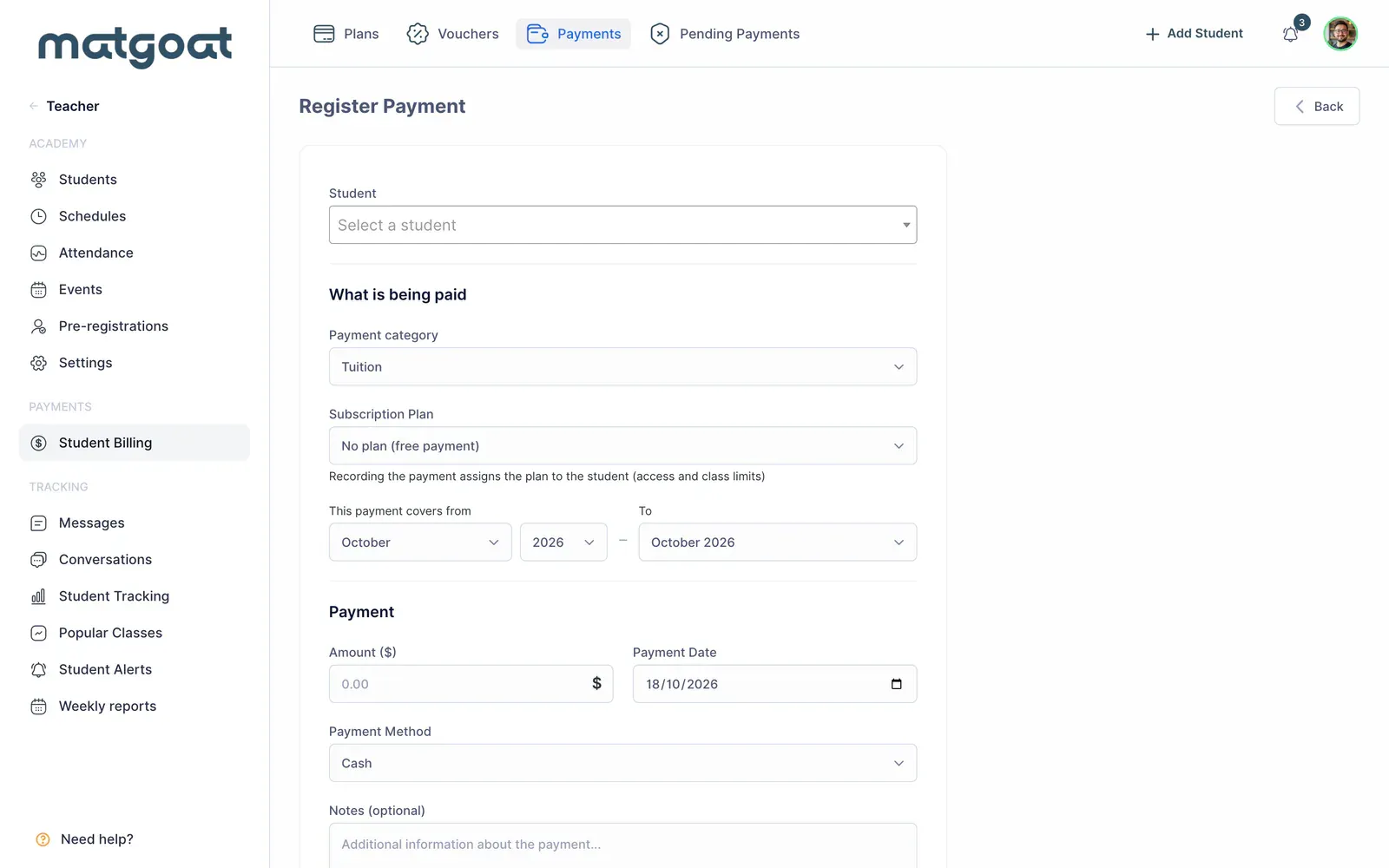
A grid cell’s quick-entry flow does not offer all these choices. Use the complete form when you need to associate a plan, coverage and enrollment fee. Do not record a month as paid merely because you have agreed to collect it later.
Save the card without duplicating the fee
Where paid coverage runs continuously from the current month, checkout can save the card without charging today. The next collection starts after the covered period, taking a later academy billing-start date into account when applicable.
This differs from a student who already has an ongoing Stripe subscription. Money received to settle that subscription’s debt needs its application to the outstanding invoice reviewed. Do not automatically treat it as advance payment for future months.
Before sharing Collect payments by link or QR code and share signup checkout, confirm that the summary correctly shows what has been paid, what remains due and when the next charge begins.
Related articles
Still have questions?
Write to us and a real person will answer, in your language.